
Seed to Spoon - Garden Planner
From Seed to SpoonHouse & Home
4.42.71K Reviews
- Version
- 80020
- Installs
- 100.00K
- Age Rating
- Everyone
Screenshots
Our Review of Seed to Spoon - Garden Planner
 Analysis by Appyee
I would approach Seed to Spoon - Garden Planner as a guide for turning a vague wish to grow something into a plan I can actually follow. It is a free House & Home app from From Seed to Spoon, aimed at people who want practical help choosing plants and keeping track of a garden. Its mix of planning, growing guidance, plant tracking, and identification makes the most sense when you want one place to learn and organize, rather than a separate app for every gardening question.
What a first-time gardener can expect
The app is built around making gardening decisions feel less like guesswork. Instead of relying only on a generic planting chart or a notebook, I can use its growing guidance to think through what to plant and when, then keep a record as the season progresses. That combination is useful because a garden is a sequence of small decisions: what fits the space, when to start, what needs attention, and what worked well enough to repeat.
It is not a substitute for looking at the plants themselves or learning the conditions in your own yard. Local weather, shade, soil, and containers all affect results, and a calendar cannot make those variables disappear. I would treat the app as a helpful starting point, then adjust when the garden gives me evidence that a plant is drying out, struggling, or thriving.
The app has a 4.4 average from around 6,300 ratings, and it has been installed over 100,000 times. That gives a new user a sense that it has found an audience, but the more useful question is whether its approach fits your routine. If you enjoy having instructions and records close at hand, the format is appealing; if you prefer to make notes on paper and follow your own planting schedule, it may feel like an extra layer.
Getting Started with Seed to Spoon
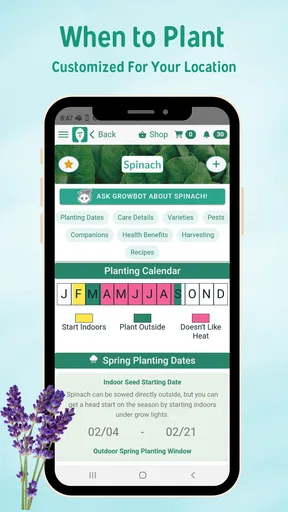
First things first, downloading Seed to Spoon - Garden Planner is a breeze. Available on both Android and iOS, it's just a quick search and click away. Once installed, you'll be prompted to set up your personal garden profile, which surprisingly, is quite fun! You enter your location, and bam! The app tailors everything based on your local growing conditions. No more guessing games about what to plant and when.
Make the first setup useful, not perfect
When setting things up, I would use the location that best represents where the plants will actually grow, rather than where I happen to be standing when I install the app. A balcony, a backyard, and a community plot can experience different sun and wind even in the same town. The profile is a starting point for local timing, not a precise reading of every corner of a property, so I would keep that distinction in mind when comparing its suggestions with what I see outdoors.
I would also begin with a short list of plants I genuinely want to eat or care for. It is tempting to browse a large catalog and plan an ambitious garden all at once, but a few well-chosen crops make it easier to learn the app’s rhythm and keep the workload realistic. A small first plan gives you room to notice what the guidance tells you, what your space can support, and which reminders or tracking habits are genuinely useful.
Seed to Spoon is free to start, with in-app purchases ranging from $4.99 to $46.99 per item. I would explore the free experience before spending anything and decide whether the available tools already cover your needs. That is especially sensible for a first season: you may discover that a simple plan and consistent observations are enough, or that you want additional paid options after you understand how you garden.
Features That Make Gardening a Breeze
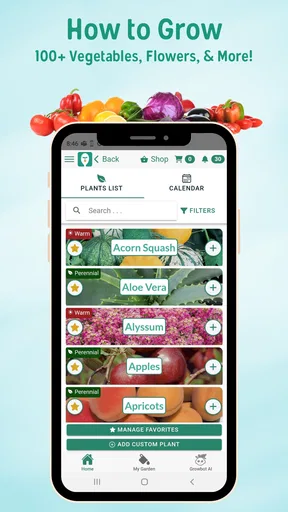
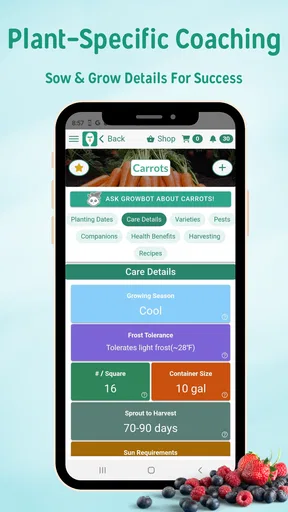
One of the standout features is the plant database. This is where the magic happens. You can explore a vast variety of plants, each with detailed growing instructions. Want to grow tomatoes? Click on it, and you'll get info on the best planting time, soil preferences, watering needs, and even companion plants that help it thrive. And the best part? It’s all written in a way that's easy to understand, even for beginners.
A useful way to work with plant guidance is to read it before buying seeds, not after a tray of seedlings is already growing. For example, checking a plant’s needs while choosing what to grow can help me spot a mismatch between its requirements and my available space or attention. Companion planting advice is also best treated as a planning prompt rather than a guarantee: plants still need suitable light, room, water, and care on their own.
The app also offers a personalized planting calendar. It syncs up with your local weather data and tells you the optimal time to sow seeds, transplant seedlings, and harvest. It's like having a personal assistant who just knows when it's time to get your hands dirty.
In everyday use, I would treat calendar dates as cues to check the garden, not commands to act blindly. If a suggested task lands during a cold spell or when the soil is not ready, waiting can be the more sensible choice. One good habit is to look ahead at the upcoming tasks once a week, then group errands such as buying seeds or preparing containers. That turns reminders into a manageable plan instead of a string of last-minute prompts.
Turn a plan into a first small success
For a reassuring first win, I would choose one familiar crop, check its growing instructions, and use the planner to decide where it could fit before planting. Then I would record the choice and follow the relevant timing guidance, while still checking the actual weather and conditions outside. The goal is not to create a perfect garden map on day one; it is to make one informed planting decision and learn how the app helps you carry it through.
A realistic routine might be a quick check on a weekend morning: open the plan, see whether anything needs attention, inspect the leaves and soil, and note what changed. If the app’s schedule and the garden disagree, I would trust the visible condition of the plant and use the difference as a lesson for next time. A record of what happened can be more useful than trying to remember whether a plant was watered or moved a week earlier.
Plant identification can also be useful when an unfamiliar seedling appears or a plant is difficult to recognize. I would use an identification result as a clue and compare it with the plant’s leaves, growth, and location before acting on it. That cautious approach matters because a mistaken identification could lead you to remove a useful volunteer or give the wrong care to something you meant to grow.
Interactive and Engaging
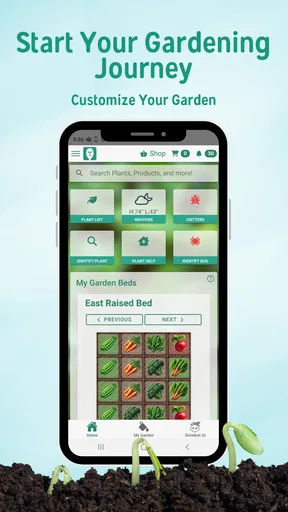
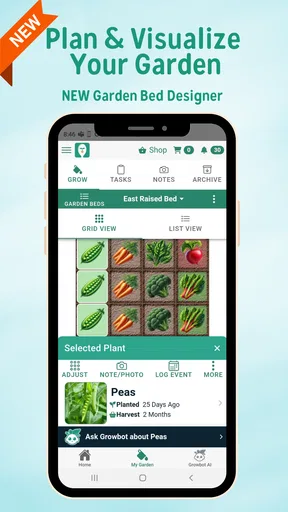
I was quite impressed by the app's interactive tools. It includes a garden layout planner, where you can map out your garden space virtually. This is super handy, especially if you're working with a small area and want to maximize your space efficiently. Plus, the visual representation helps you visualize your future garden even before you start planting.
The layout tool is most valuable before a trip to buy plants or supplies, when it can help me think through how many things I can reasonably fit. I would use it to compare a couple of simple arrangements rather than chase a detailed blueprint. A visual plan can expose overcrowding or awkward placement early, but it cannot show every real-world limitation, such as changing shade or the way a container dries out faster than a garden bed.
For a balcony grower, that trade-off is particularly clear. A map can make the available floor space easier to understand, while sunlight and access to water may determine the actual arrangement. I would plan around the conditions I observe at different times, then use the app to keep the chosen plants and tasks organized. For a large, established garden where you already know every bed by heart, a dedicated paper map may be quicker than entering everything digitally.
Another cool feature is the community aspect. The app connects you with other gardeners. You can share tips, ask questions, and even swap seeds if you’re into that. It's like being part of a gardening club, minus the actual meetings.
Community advice can help when a plant behaves differently from what you expected, but I would compare suggestions with the plant’s needs and the conditions in my own garden. A tip that works for someone in another climate or with a different setup may not transfer directly. For a very specific problem, a local gardener who can see the plant and its surroundings may be more useful than a general discussion.
Learning as You Grow
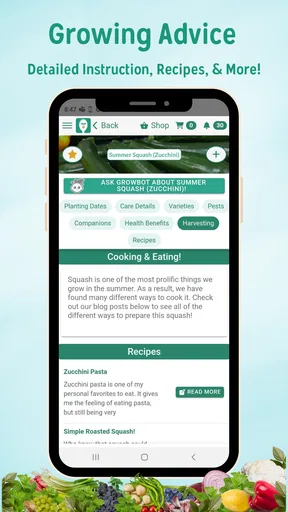
For those who love to learn, Seed to Spoon offers a plethora of educational resources. From blog posts to video tutorials, there’s a wealth of knowledge to tap into. Whether you want to dive deep into organic pest control or learn about soil health, the app has it covered.
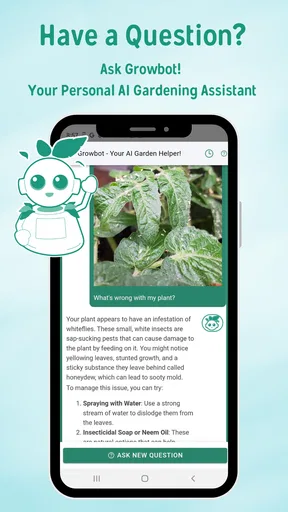
I would use learning material in response to a real question rather than trying to absorb everything before planting. If leaves begin to look unusual, for instance, it is easier to focus on the relevant topic, inspect the plant, and decide on a next step than to scroll through broad advice without a reason. The app’s combination of guidance and tracking supports that practical loop: notice something, learn about it, act, and record what follows.
And if you’re ever unsure about something, the app’s FAQ section is pretty comprehensive. It's like having a troubleshooting guide at your fingertips, answering all those "what if" scenarios that might pop up as you garden.
Even with a built-in reference, some questions need context. A general answer can help explain the basics, but it cannot replace careful observation or local expertise when a plant’s problem is serious or persistent. I would use the FAQ to narrow down what to check, then make a small, considered change rather than trying several remedies at once and losing track of what helped.
Where it fits among gardening options
The usual alternatives are a paper notebook, a calendar, separate plant-identification tools, or searching the web each time a question comes up. Those can all work, and an experienced gardener may prefer them because they are flexible and familiar. Seed to Spoon’s advantage is having planning and plant information in one gardening-focused place, so a beginner does not have to invent a record system before getting started.
The trade-off is that a digital planner asks you to keep using it. If you only want a quick answer about one plant, a search or a reference book may be faster. If your main need is a free-form diagram with exact measurements, a general drawing tool or graph paper may suit you better. I see this app as strongest when you want ongoing guidance and a simple thread connecting choices, timing, and observations.
It is rated for Everyone, and the current version is 80015, with a minimum operating-system requirement of 7.0. Those details make it sensible to check that your device can run it before planning to rely on it through a growing season. The app has been around since December 7, 2017, which gives it a longer history than a brand-new gardening tool, though I would still judge it by whether its current workflow suits me.
Who will get the most from it
I would recommend trying it if you are new to growing food, want help turning a few seed packets into a sensible plan, or tend to forget what you planted and when. It can also suit a returning gardener who wants to organize several crops without rebuilding a calendar from scratch. The strongest fit is someone willing to check the app regularly and then verify its suggestions against real plants and local conditions.
I would skip it, or keep it as a secondary reference, if you dislike maintaining digital records, already have a reliable system, or need a highly technical tool for managing a large commercial growing operation. It may also be unnecessary if you only grow one hardy plant and do not want ongoing guidance. The point is not to make every gardener use an app; it is to reduce friction for people who benefit from reminders and a structured place to learn.
My Personal Take
As someone who's always wanted to garden but never knew where to start, Seed to Spoon has been a game changer. It demystifies the entire process, making it accessible and fun. I found myself looking forward to app notifications, reminding me to water my plants or check for pests. It’s not just about growing plants; it’s about growing your passion too.
My main reservation is that an app can make gardening feel more exact than it really is. A suggested date or reminder cannot account for every patch of shade, surprise rain, or change in a plant’s condition. I would follow the guidance without treating it as a promise, and I would avoid letting notifications replace a quick look at the leaves and soil. The best results come from combining its structure with ordinary attention.
In conclusion, Seed to Spoon - Garden Planner is more than just an app; it’s a gardening companion. Whether you’re a seasoned gardener or a complete newbie, this app provides all the tools and information you need to cultivate a thriving garden. So, if you’re ready to turn your green dreams into reality, give Seed to Spoon a try. Happy planting!
Verdict
Strengths of Seed to Spoon - Garden Planner
- Easy-to-use interface for beginners.
- Comprehensive plant database included.
- Customizable garden layouts.
- Weather tracking for optimal planting.
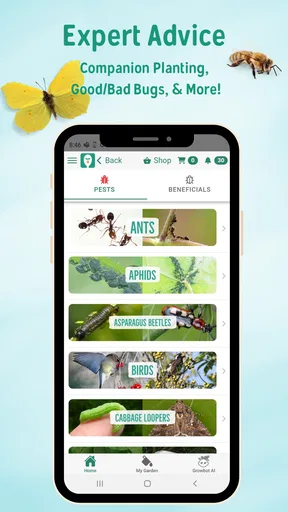
- Integrated pest management tips.
Limitations of Seed to Spoon - Garden Planner
- Limited offline functionality.
- No integration with smart devices.
- Requires frequent updates.
- Occasional app crashes reported.
- Subscription required for premium features.
Similar Picks in This Category
View All
Universal TV Remote Control
CodeMatics Media Solutions3.9

AlfredCamera Home Security app
Alfred Systems Inc.4.7

Planner 5D: AI Home Design
Planner 5D4.5

Universal Tv Remote-Cast to TV
One Music Player4.1

Zillow: Homes for Sale & Rent
Zillow Group4.8

99acres Buy/Rent/Sell Property
infoedge.com4.3
Frequently Asked Questions
What platforms is Seed to Spoon - Garden Planner available on?
Seed to Spoon - Garden Planner is available for both Android and iOS devices. Users can download it from the Google Play Store for Android devices or the Apple App Store for iOS devices. This ensures compatibility with a wide range of smartphones and tablets, allowing for easy access to gardening resources.
Is an internet connection required to use Seed to Spoon - Garden Planner?
While an internet connection enhances the app's functionality by providing updates and access to community features, basic garden planning and resource information can be accessed offline. This allows users to manage their gardens even in areas with limited connectivity, making it a versatile tool for gardeners everywhere.
Does Seed to Spoon - Garden Planner offer personalized gardening tips?
Yes, the app provides personalized gardening tips based on your location, climate, and garden preferences. By inputting your region and plant choices, the app tailors advice to optimize your gardening efforts. This feature helps users maximize their garden's potential and improve plant health and productivity.
Can beginners use Seed to Spoon - Garden Planner effectively?
Absolutely! Seed to Spoon - Garden Planner is designed with both beginners and experienced gardeners in mind. It offers easy-to-follow guides, tutorials, and a user-friendly interface that simplifies the gardening process. New users will find the app's step-by-step instructions helpful as they start their gardening journey.
Are there any costs associated with using Seed to Spoon - Garden Planner?
The app offers a free version with essential features for garden planning. However, there may be in-app purchases available for advanced features and additional content. This allows users to choose the level of functionality they need while supporting the app's continuous development and improvement.
